
Download Alliance – Free Secure Mac File Sharing App
Overview
Alliance is a free file‑sharing application built exclusively for macOS, positioning itself in the bustling arena of peer‑to‑peer (P2P) tools. In an age where collaboration and rapid data exchange are essential, Alliance offers a streamlined, user‑friendly experience that caters to both tech‑savvy power users and newcomers alike. The app eliminates the need for centralized servers by leveraging a decentralized network, allowing users to locate, download, and share files directly from one another’s machines.
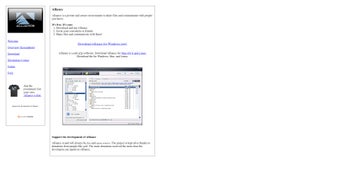
This architecture not only speeds up transfers but also adds a layer of resilience—if one node goes offline, the network reroutes traffic through other peers, ensuring continuity. From a design perspective, Alliance embraces macOS’s native look and feel, featuring clean typography, intuitive navigation, and a dark‑mode option that reduces eye strain during long sharing sessions. The interface is divided into three primary panes: a searchable library of available files, a “My Uploads” section where you can manage your own shared content, and a real‑time activity feed that displays ongoing transfers and peer connections.
Each pane is equipped with contextual tooltips, making the learning curve virtually non‑existent. Security is another cornerstone of Alliance. While the app operates on a P2P model, it incorporates end‑to‑end encryption for all data packets, ensuring that files cannot be intercepted or tampered with during transit.
Users also have granular control over who can access their shared folders, with options ranging from public, link‑based sharing to password‑protected, invitation‑only rooms. Additionally, Alliance respects privacy by not logging download histories or storing metadata on external servers. In practice, Alliance shines in scenarios where teams need to exchange large assets—such as high‑resolution graphics, video footage, or software builds—without incurring bandwidth costs associated with cloud storage.
Because the app is free, it presents a cost‑effective alternative to subscription‑based services, while still delivering reliable performance, regular updates, and responsive community support. Whether you’re a freelance designer, a small business, or simply a macOS enthusiast looking for a trustworthy way to share files, Alliance offers a compelling blend of speed, security, and simplicity.
Key Features
- Decentralized Peer‑to‑Peer Network: No central server, reducing latency and eliminating single points of failure.
- End‑to‑End Encryption: All file transfers are encrypted with industry‑standard AES‑256, safeguarding data from eavesdropping.
- Native macOS Design: Dark mode support, retina‑ready icons, and seamless integration with Finder.
- Granular Sharing Controls: Public links, password‑protected rooms, and invitation‑only access for maximum privacy.
- Real‑Time Transfer Dashboard: Live progress bars, peer connection stats, and bandwidth usage monitoring.
- Resume‑Able Transfers: Interrupted downloads can be paused and resumed without losing progress.
- Automatic Update System: Secure, one‑click updates keep the software current without manual downloads.
- Cross‑Platform Compatibility: While optimized for macOS, the underlying protocol works with Windows and Linux peers.
- Resource‑Efficient Engine: Low CPU and memory footprint, allowing background operation on older Mac hardware.
- Community‑Driven Support: Active forums, detailed documentation, and frequent feature requests from users.
Installation & Usage Instructions
Getting started with Alliance is intentionally straightforward. Follow the steps below to download, install, and begin sharing files on your Mac:
- Download the Installer: Visit the official Alliance website and click the “Download for macOS” button. The file will be a
.dmgpackage, typically under 30 MB. - Mount the Disk Image: Double‑click the
.dmgfile. macOS will open a new window displaying the Alliance app icon. - Drag to Applications: Drag the Alliance icon into your
Applicationsfolder. This copies the app to your system and prepares it for launch. - Open the App: Navigate to
Applications → Allianceand double‑click to open. The first launch will trigger a security prompt; select “Open” to confirm. - Grant Permissions: Alliance requires access to your network and file system. In the macOS “Security & Privacy” panel, enable “Full Disk Access” for Alliance to ensure seamless file sharing.
- Create a Profile: Upon launch, you’ll be prompted to create a user profile. You can use an existing email address or generate a pseudonymous handle. This identifier is used to locate peers in the network.
- Configure Sharing Settings: Navigate to the “Settings” tab. Here you can toggle encryption, set bandwidth limits, and define sharing permissions (public, password‑protected, or invite‑only).
- Start Sharing: Drag any file or folder into the “My Uploads” pane. Alliance will automatically generate a shareable link and broadcast the file’s availability to the P2P network.
- Search & Download: Use the search bar in the “Library” pane to locate files shared by other users. Click a result, review the peer’s rating, and press “Download”. The transfer will appear in the “Active Transfers” section.
- Monitor & Manage Transfers: The real‑time dashboard shows speed, ETA, and peer connections. You can pause, resume, or cancel transfers with a single click.
- Update Regularly: Alliance checks for updates on launch. When a new version is available, you’ll receive a notification—click “Update” to keep the app secure and feature‑rich.
The entire process, from download to first file transfer, typically takes less than five minutes on a standard broadband connection. For advanced users, Alliance also offers a command‑line interface (CLI) accessible via Terminal, allowing scripted batch uploads and automated synchronization tasks.
Compatibility & System Requirements
Alliance is engineered for macOS, supporting versions from macOS 10.13 (High Sierra) up through the latest release, macOS 15 (Ventura). The application runs natively on both Intel‑based Macs and Apple Silicon (M1, M2, and later) thanks to Apple’s universal binary packaging. Minimum hardware specifications include:
- Processor: 1.4 GHz dual‑core (Intel) or Apple Silicon equivalent.
- RAM: 2 GB (4 GB recommended for heavy multitasking).
- Disk Space: 100 MB free for installation plus additional space for temporary transfer buffers.
- Network: Stable broadband connection (minimum 5 Mbps upload/download for optimal performance).
While Alliance is a macOS‑centric product, its underlying P2P protocol is compatible with Windows and Linux clients that support the same protocol (e.g., the open‑source “Alliance‑Core” client). This cross‑platform capability means you can share files with colleagues who use different operating systems without needing additional software. However, the graphical user interface (GUI) is exclusive to macOS; Windows and Linux users must rely on the CLI or third‑party GUI wrappers.
The app also integrates with macOS’s native firewall and privacy settings. If you have a third‑party firewall, ensure that ports 6881‑6889 (TCP/UDP) are open, as these are the default ports Alliance uses for peer discovery and data transfer. For users operating behind corporate VPNs, Alliance includes a “VPN‑Friendly” mode that tunnels traffic through port 443, bypassing most network restrictions.
In terms of future‑proofing, the development team follows Apple’s annual WWDC roadmap, guaranteeing that Alliance will receive timely updates for new macOS releases. Regular beta builds are available through TestFlight, allowing power users to test upcoming features before they reach the stable channel.
Pros, Cons & Frequently Asked Questions
Pros
- Completely free with no hidden subscription fees.
- End‑to‑end encryption protects every transfer.
- Native macOS design ensures smooth integration and low resource usage.
- Supports both Intel and Apple Silicon architectures.
- Cross‑platform P2P compatibility expands sharing possibilities.
- Resume‑able downloads save time on unstable connections.
- Granular sharing controls give users full privacy management.
Cons
- No dedicated mobile app; mobile users must rely on web links.
- Advanced configuration (e.g., custom ports) may be intimidating for beginners.
- While secure, the P2P model can be slower than dedicated cloud services for small files on congested networks.
- Lack of built‑in cloud storage means files are only available while peers stay online.
FAQ
Is Alliance really free or are there hidden costs?
Alliance is 100 % free to download and use. There are no subscription tiers, in‑app purchases, or hidden fees. All features, including encryption and advanced sharing controls, are available at no cost.
How secure is the file transfer process?
Every file is encrypted with AES‑256 end‑to‑end encryption before leaving your computer. The encryption keys are generated locally and never stored on a server, ensuring that only the intended recipient can decrypt the data.
Can I use Alliance to share files with Windows users?
Yes. While the macOS GUI is exclusive to Apple devices, the underlying P2P protocol is compatible with Windows and Linux clients that support the same protocol. Windows users can download the companion “Alliance‑Core” client or use the web link to access shared files.
What happens to my files if the peer goes offline?
Because Alliance operates on a decentralized network, files are stored on the peers that share them. If a particular peer disconnects, the file remains accessible from any other online peer that has a copy. If no peers are online, the file will be unavailable until at least one returns.
Does Alliance consume a lot of system resources?
No. Alliance is built with a lightweight engine that typically uses less than 50 MB of RAM and a minimal CPU footprint during idle periods. Even during active transfers, resource usage stays well below 10 % on modern Macs, making it suitable for older hardware.
Review Summary
Alliance delivers a compelling blend of security, simplicity, and cross‑platform flexibility that is rare in the free file‑sharing space. Its native macOS design feels polished, while the underlying P2P architecture ensures fast, resilient transfers without reliance on third‑party cloud services. Although the lack of a dedicated mobile client may be a drawback for some, the overall value proposition remains strong for Mac users seeking a trustworthy, zero‑cost solution.
Conclusion & Call to Action
In summary, Alliance stands out as a free, secure, and highly functional file‑sharing app tailored for the macOS ecosystem. Its peer‑to‑peer foundation eliminates the need for costly cloud subscriptions, while built‑in encryption safeguards every byte that travels across the network. Whether you’re a designer exchanging large media assets, a developer sharing code builds, or a small team needing a quick way to move documents, Alliance offers a reliable, low‑overhead solution that respects both privacy and performance.
Ready to experience seamless file sharing on your Mac? Download Alliance now and start sharing instantly—no registration fees, no hidden charges, just a secure, fast, and user‑friendly tool that puts you back in control of your data.







